July 04, 2010

Ways to get your blog noticed

Advertising and spreading out your new blog is one of the challenges. Especially when you want to earn out of it. But what can a beginner can do about that? In simpler ways? Here is a list of most prominent techniques of sharing your content online with others.

E-mails
An age-old technique., but works like a charm. Let your first circle of contacts know what you are doing. Send them your posts by e-mail. Install “Email this post” link to your post footer. That helps people forward your work to others.

Links
Post links to your blogs wherever possible. Have a look at the social bookmarking sites, such as del.ici.us, digg etc. These generate a good traffic when you post your links in appropriate categories. They could also bring you an effective traffic from search engines.

Aggregates
Aggregates are sites that lists blogs. Make sure that such aggregator sites  can ping your blog. Examples include
technorati, blo.gs, weblogs.com or pingomatic.

Syndicate
RSS feeds are step 2 of your blog publicizing. Encourage visitors to subscribe to your RSS.

Install Blogrolls
Blogrolls are merely, a list of blogs that you are interested in. Showing blogroll on your site tells more about what you like and with whom you would like to communicate more often. This bring people who share your interests to your way.

Communicate with people
Everybody wants to have their say in everything. Make it easier for people visiting your site. Comments, opinion polls, etc are few ways in which you can involve people to contribute and there by, keeping your blog more lively.

What are all the ways do you spread out your work? Let others know by leaving your comment here.

May 26, 2010

உங்க ப்ளாகில் Forum அமைக்க

image இப்போ இருக்கற வெட்டி வேலை போதாது, மத்தவங்கள நம்ம ப்ளாகிலேயே குடி இருக்க வெக்கணும்னு நினைக்கறவங்க… இல்லே நாம எதாவது உபயோகமா ஷேர் பண்ணிக்குவோமேனு (என்னைய மாதிரி) நினைக்கறவங்க உங்க ப்ளாகிலேயே ஒரு forum சேர்த்துக்கலாம்.

Tal.ki அப்படின்னு ஒரு சர்வீஸ் .. ஒன்னும் பெரிய விஷயம் இல்லே. உங்க ப்ளாக்ல அவங்க குடுக்கற ஒரு கோட்-ட சேர்த்துட்டா போதும். உங்க Forum ரெடி. சரி. கொஞ்சம் detail-a பார்ப்போம்.

- உங்க ப்ளாக்-ல ஒரு தனி பக்கம் create பண்ணிடுங்க. (போஸ்ட் இல்லே.. ஒரு பேஜ்).
- அதோட "Edit HTML"-ல இவங்க குடுக்கற கோட்-ட பேஸ்ட் பண்ணி, சேவ் பண்ணிட்டா அம்புட்டு தான்.

(என்னோட ப்ளாகில நான் சேர்த்திருக்கேன். பாருங்க). மத்த forum மாதிரி ஒரு database வெச்சி members எல்லாம் நீங்க மெயின்டேன் பண்ண வேண்டிய அவசியம் இல்லே. உங்க கூகிள், பேஸ்புக், OpenID, எல்லாம் செல்லுபடியாகும். உங்க forum-ல தனியா மெம்பெர் ஆக வேண்டிய அவசியம் இல்லே. அவங்க அவங்க ID யூஸ் பண்ணிக்கலாம்.

மேலும் தெரிஞ்சிக்க இங்க போங்க.. ட்ரை செஞ்சி பார்த்து சொல்லுங்க.

Tal.ki – A Free Forum For Your Website or Blog

Planning to make a forum on your site or your blog? Tal.ki is a free forum application that installs an user forum on your website. It is also a one-minute-setup. All you have to do is to grab the piece of code from here and copy it to wherever you want within your site. And you are ready to go!

image Unlike most of the other sites / free stuffs, this Tal.ki doesn’t require you to signup for any free accounts. The users are not required to create any image account on your site. They could login using their own accounts on Google, Yahoo!, MySpace, OpenID etc. (there is a whole big list out there!). And so, there is no more account creation, and dedicated set of users on your site. You don’t have to maintain any user information in your databases or provide with sessions. Tal.ki does everything for you. But one must keep in mind that all the forums are public. Member-only forums are available with a paid-version of Tal.ki.
The forum administrator can also control the default login for the forum. All that has to be done is, just, to choose which login button appears :).

The forum itself lets you to add quick posts with support for photos (over web), quoted text, embedding (YouTube videos etc), sharing via twitter, e-mail (and all), custom signatures etc.
 

The free version of Tal.ki comes with
- Unlimited Postings
- Unlimited Members
- 5 forums (all public)
- API access
- 15 recent topics

Three categories of priced versions have various other features. But if you are hosting a personal or small scale website and if you really don’t care about forums being public, then the free version is what is best suited to you. You can see a demo site with Tal.ki embedded here or here.

Whatz more? They also expose a plugin for Wordpress and Google Sites. Do let us know your feedback about Tal.ki! A good idea to add this to your Blogger blog will be to create a page and add the code into it. Check out my “My Forum” page above to have a feel of it!

Bookmarks Sync with Google

I’m not sure how many of us had noticed… Xmarks for Google Chrome browser is not working anymore. Recently, I’m facing problems with synchronizing my bookmarks/passwords across my browsers and laptops.

What is Xmarks?

A little introduction about Xmarks, for people who don’t know much about it. Xmarks is an efficient add-on that support synchronizing your bookmarks, passwords etc across different browsers and across all of your work stations. Currently they support Google Chrome, Firefox & IE. My primary browser is Google Chrome. I was one of those happy buddies when they introduced it for Chrome. You can create multiple profiles (work, home, personal etc) and organize your bookmarks in them. This was quite a powerful add-on for Firefox (I don't know how it is for IE, as I'm not using it there).

As I said before, recently the service is not working anymore for Chrome. There are server synchronization errors. For people who face this, Google Bookmarks could be an alternate. While in Firefox, you need a add-on to use this, in Chrome it's not the case. You can use the "Sync" feature for synchronizing your bookmarks to your Google Account (which then is replicated to other browsers). And it is just not bookmarks. You can also add your theme to it. Though, not very useful for other browsers, but for people working primarily on Chrome, it provides the same environment & mood everywhere!

How to setup?

image

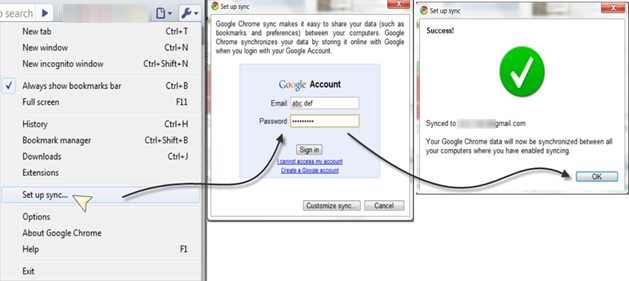
1. Choose "Setup Sync" from Customization menu on your chrome.
2. Sign in to your account. And that's all you have to do.

The synchronization of bookmarks happen until you are logged in to your account on the browser. Once you log-out the synchronization stops. But nothing is deleted from your Google account itself. Only the changes that you make (to bookmarks etc) will not get to your account.

What are the added advantages of using "Google"?

1. No data is lost anywhere. Everything is in your Google account.
2. You don't have to sign in to, yet another service for synchronizing bookmarks.
3. Create lists & share your bookmarks with others.
4. Fully searchable.

image


All those are OK.. but where are these stored in Google? Don’t rush to www.google.com/bookmarks. They are stored in your Google Docs now. You can find them under “Google Chrome” directory.


My Take: I do see that I cannot launch Bookmarks from within the Google Docs. May be it's intended. But strange!! :)

May 09, 2010

இன்டர்நெட் எக்ஸ்ப்ளோரர் 9 - எப்படி இருக்கும்?

இன்டர்நெட் எக்ஸ்ப்ளோரர் 9-ல பல புது விஷயம் எல்லாம் வர போகுது. இது வரைக்கும் எந்த web standards-யும் மதிக்காத மைக்ரோசாப்ட், இதுல ரொம்ப திருந்திருக்காங்கனு கேள்வி பட்டேன். அதுல ஒரு சில விஷயம்ஸ் இதோ..

- HTML5 & CSS3 சப்போர்ட். 
- ஸ்பீட் & மெமரி விஷயத்துல ரொம்ப சேன்ஜ் இருக்கு. (பின்ன.. chrome, firefox எல்லாம் சமாளிக்கனுமே)
- மத்தவங்களும் IE-க்காக டெவலப் பண்ணலாம். அதுக்கு வழி பண்ணிருக்காங்க.

சரி.. இதெல்லாம் இருக்கட்டும். IE9 ஒரு ப்ரிவ்யூ பார்த்துடலாமா? இத டவுன்லோட் பண்ணி இன்ஸ்டால் பண்ணி பாருங்க.